You hear a guitar tone in a song, plug in your own gear, copy a few settings from the internet…and it still sounds nothing like the recording.
Usually, the problem isn’t that the settings are completely wrong. It’s that they were made for somebody else’s guitar, pickups, amp, pedals and signal chain.
Tonafy is a guitar tone finder and amp settings finder that adapts a song’s tone to the guitar and amp you actually own.
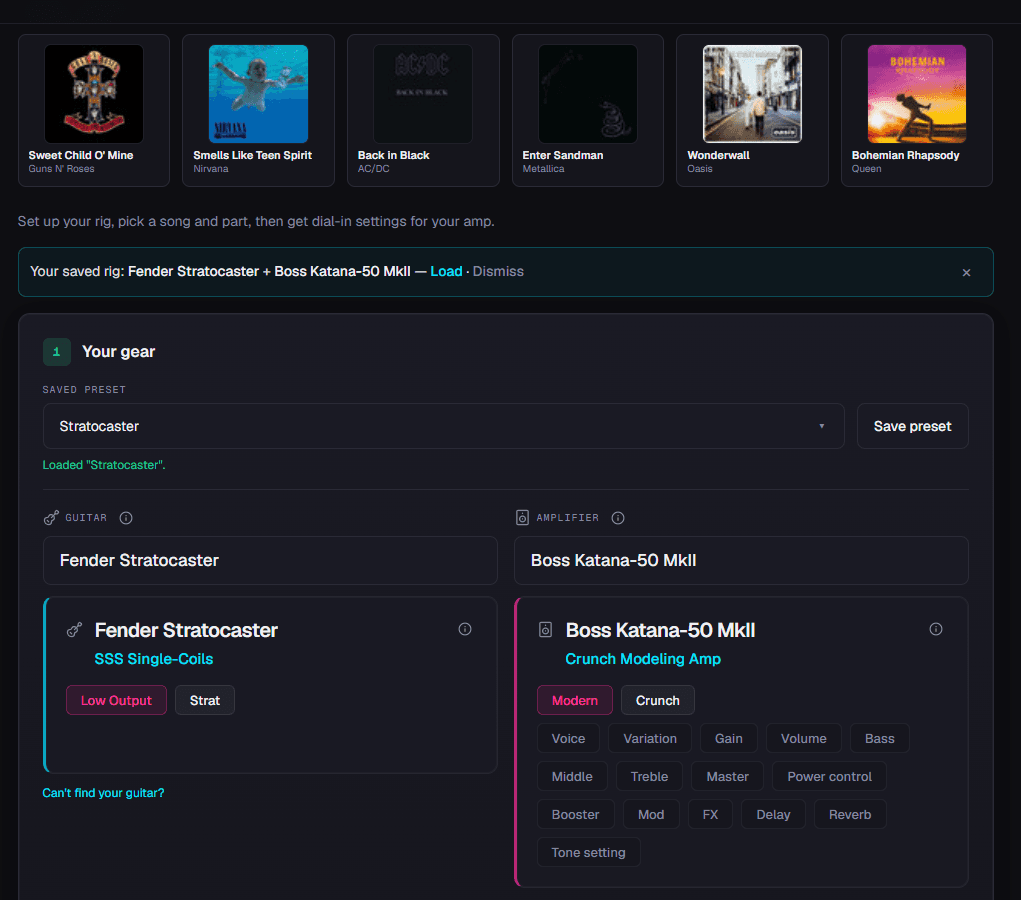
Choose your guitar, choose your amp, search for a song, and Tonafy gives you a practical starting point for your rig—including gain, EQ, effects, pickup selection and playing tips.
Why copying someone else's amp settings often doesn't work
A setting like:
Gain 6
Bass 5
Middle 7
Treble 6
doesn’t mean very much without knowing the equipment behind it.
A Les Paul with humbuckers hitting a Marshall behaves very differently from a Stratocaster plugged into a Boss Katana. Even if both players dial in exactly the same numbers, the result can be noticeably different.
Pickup output changes how hard the amp is driven. Different amps have different EQ ranges and gain structures. Speakers, effects and even your picking attack change the result again.
That’s why Tonafy doesn’t simply give everyone the same settings for a song.
It tries to answer the more useful question:
How do I get close to this tone using my gear?
How the guitar tone finder works
1. Choose your guitar
Select the guitar you actually play.
The pickup configuration matters because a bright single-coil guitar may need different EQ and gain than a guitar with higher-output humbuckers.
2. Choose your amp
Select the amp you’re using.
Tonafy works with the controls and capabilities available on that amp instead of showing settings for equipment you don’t own.
3. Search for a song
Find the song and guitar part you want to recreate.
A clean intro, rhythm guitar and lead solo can require very different sounds, even within the same song.
4. Get settings for your rig
Tonafy gives you a starting point for the controls available on your amp.
Depending on your rig, that can include:
- Gain
- Bass
- Middle
- Treble
- Volume
- Master
- Pickup selection
- Booster or drive
- Modulation
- Delay
- Reverb
- Amp mode and switches
- Playing suggestions
The goal isn't to pretend that completely different equipment can become identical.
The goal is to get your rig closer to the character of the recording without hours of guessing.
Example: finding a song tone with different gear
Imagine you want to play a song whose original tone came from completely different gear than what you own.
Simply copying the original amp settings isn't enough.
Different pickups sound different from each other, and every amp has its own gain structure and onboard effects.
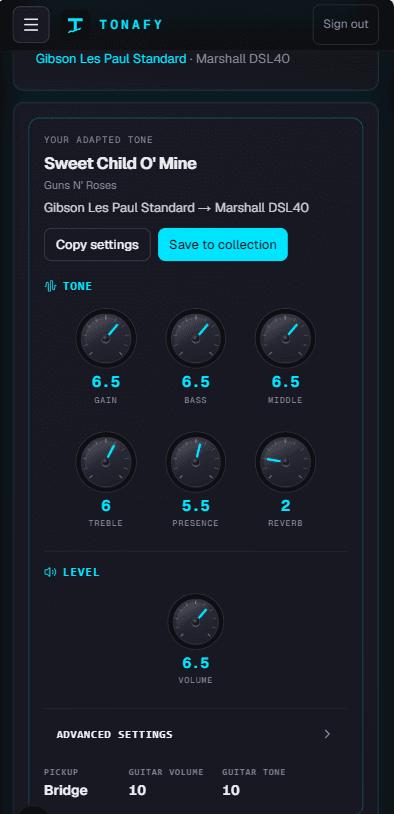
Tonafy can compensate by adjusting things like gain, mids and treble while recommending the most appropriate pickup and available onboard effects.
Instead of:
“Here are the original guitarist's settings.”
you get:
“Here is a practical version of that tone for your own rig.”
Find guitar amp settings by song without owning the original rig
Traditional guitar tone guides are still useful. Knowing what was used on a recording gives you an important reference point.
The problem starts when that information becomes impossible to reproduce.
Maybe the original guitarist used:
- A vintage amplifier you don't own
- A completely different pickup type
- Several studio effects
- An expensive pedalboard
- Equipment that isn't available anymore
You shouldn't need to buy an entirely new rig just to get closer to one song.
Tonafy uses the reference tone as the target and your own equipment as the constraint.
That makes it particularly useful if you're using flexible amps such as a Boss Katana, but the same idea applies across different guitars and amplifier types.
Can an AI guitar tone finder perfectly recreate a recording?
No—and anything promising a perfect recreation from completely different equipment is overselling it.
Recorded guitar tone also depends on the cabinet, microphone, room, double tracking, studio EQ, compression and the guitarist's hands.
Tonafy is designed to give you a strong starting point, not claim that turning six knobs will magically reproduce an entire studio recording.
Dial in the suggested settings, play the part, then make small adjustments for your room, volume and playing style.
That's usually far more useful than starting from zero.
Stop guessing and start playing
If you've been searching for guitar amp settings for a song but keep finding settings for equipment you don't own, try approaching it the other way around.
Tell Tonafy what you're playing through first.
Then let it adapt the tone to your rig.
Guitar Tone Finder FAQ
How do I find the guitar tone from a song?
Start by identifying the guitar, pickup type, amp character and important effects used for the part. Tonafy uses that reference and adapts the settings to the guitar and amp you own.
Can I get guitar amp settings for a specific song?
Yes. Search for the song in Tonafy, select your own guitar and amp, and generate settings intended as a starting point for that combination.
What if I don't own the same amp as the original guitarist?
That's the main reason to adapt the tone. Tonafy translates the characteristics of the reference sound to the controls and effects available on your amp rather than requiring the original equipment.
Will the settings sound exactly like the recording?
Not exactly. Recording techniques, cabinets, microphones, pedals and playing style all affect tone. The aim is to give you a practical, gear-specific starting point that you can fine-tune by ear.
What's the difference between an amp settings finder and a tone finder?
An amp settings finder usually just lists one set of knob values for a song. Tonafy works as both: it finds the reference tone and adapts the amp settings to the specific guitar, amp and pedals you own.